Become a Hands-on Fabric Expert
A practical tour of Microsoft Fabric for people who already know the Power BI side and want the data engineering half. You will work with the Lakehouse, data pipelines, notebooks, the SQL warehouse and semantic models,…
Course description
A practical tour of Microsoft Fabric for people who already know the Power BI side and want the data engineering half. You will work with the Lakehouse, data pipelines, notebooks, the SQL warehouse and semantic models, tied together in one project that carries data from source to report.
The focus is on understanding how the pieces fit, so you can set up a clean workspace, choose the right item for each job and explain your architecture to a team.
Class schedule
- Days & time
- Onsite Monday to Friday, 3:00-6:00 PM or 6:00-9:00 PM. Online Saturday & Sunday only
- Duration
- 8 weeks
What You'll Learn
Skills You'll Gain
Test Yourself
Set up a Fabric workspace the way a team would
Start a trial, create Dev and Prod workspaces, assign roles to two classmates, and write down which item goes where and why. Most messes we see in real tenants begin with one giant workspace nobody owns.
Hands-on Lab Task
Land raw files and build bronze, silver and gold
Load a distributor's CSV exports into a Lakehouse, clean them into silver Delta tables and build a gold sales table. Then drop in a corrected file and replay the whole chain without hand edits.
Hands-on Lab Task
Build a parameterised pipeline with an alert
Create a pipeline that loops over a list of tables, copies each one with a Copy activity, runs a notebook and sends you a message when something fails. Break it on purpose, then read the run history to find out why.
Hands-on Lab Task
Write a PySpark notebook that deduplicates and joins
Clean a telecom recharge extract, remove duplicate transactions with a window function, join the dimensions and write a Delta table. Check the row counts before and after, and explain every row that went missing.
Hands-on Lab Task
Model and load a warehouse star schema
Create fact and dimension tables in a Fabric Warehouse, load them from your lakehouse with T-SQL, and check that a Power BI slicer gives the same total as your SQL.
Hands-on Lab Task
Ship a Direct Lake report with row-level security and an alert
Build a semantic model over your gold tables, create a regional security role, test it with View as, and set an Activator rule on a live event stream that messages you when a threshold is crossed.
Hands-on Lab Task
Curriculum
A student of ours spent a whole afternoon building a pipeline, then couldn't find it again because it sat in his "My workspace" and the rest of the team had no access. Fabric rewards people who understand where things live before they click anything. This week is the map: tenant, capacity, workspace, item, and the single storage layer under all of it, OneLake.
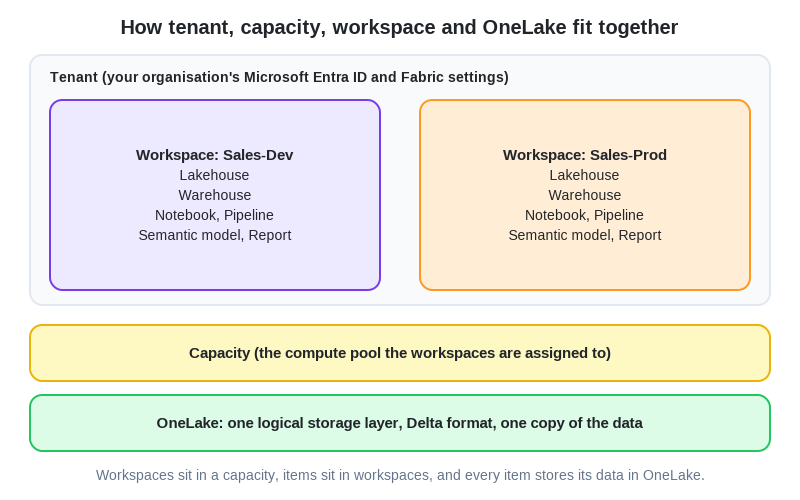
What we cover
- Day 1: What Fabric is and what it replaces. Where Power BI, Azure Data Factory, Synapse and Spark ideas show up inside it, and the tenant and Entra ID basics
- Day 2: Capacities and the trial. What a capacity is, how workspaces get assigned to one, and why you should check Microsoft's current documentation for trial rules and limits rather than trust a blog post from last year
- Day 3: Workspaces and items. Roles (Admin, Member, Contributor, Viewer), naming conventions and a Dev and Prod split
- Day 4: OneLake in plain words. One logical lake for the whole tenant, Delta as the default table format, and the OneLake file explorer on your laptop
- Day 5: Lakehouse or Warehouse? A decision exercise with six small business cases, and a first look at the Monitor hub
In the lab
Create a Dev workspace and a Prod workspace, add a Lakehouse to Dev, upload a small sales CSV and view it from OneLake. Give a classmate the Viewer role and see what they can and can't do. One gotcha practitioners learn the hard way: workspace roles are inherited by every item inside, so give access at the right level on day one.
Bring back next week
A one-page sketch of your workspace layout, plus your answer to "which of the six cases would you put in a Lakehouse and which in a Warehouse, and why?"
Batches
Pick a batch that fits your schedule, then use the enquiry form to reserve your seat.
No open batches right now, submit your details and we'll notify you when the next one starts.
An instructor will be assigned when the next batch is scheduled.
Student Reviews
No reviews yet, be the first to enroll and share your experience.
Requirements
- Basic SQL such as SELECT, JOIN and GROUP BY. Familiarity with Power BI helps but is not required.
Fee by mode