AI Basics & History05 Nov 2026
The AI Era: The Complete Series Guide
One page that lists every post in The AI Era series, grouped by theme, with a short method for checking any AI claim yourself.
By Faisal Adnan
Faisal Adnan · 05 Nov 2026
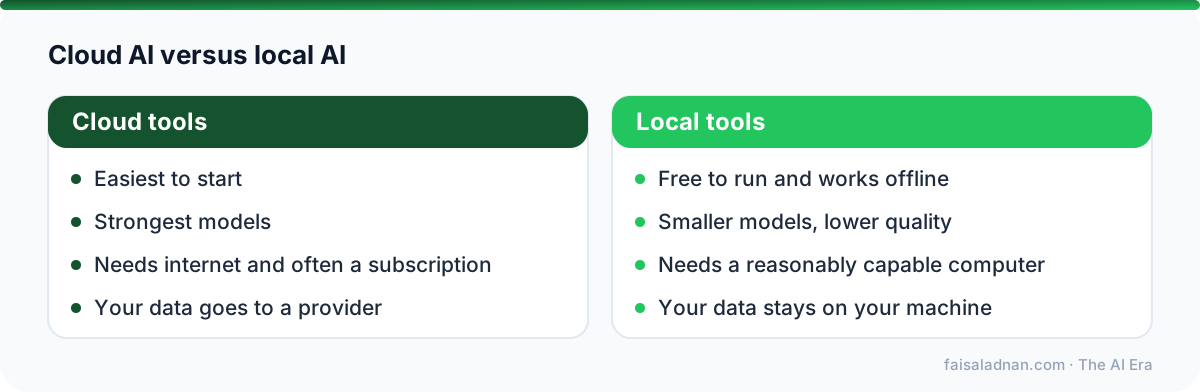
You do not need a paid subscription to learn AI. A large part of the best tooling is open source, which means you can run it yourself, read the code and change it. This is the first of three posts that list free tools I would try, with plain-language notes and the licence of each. Tool names are plain text; searching the name will find the official page.
Key takeaways
If you are new to language models, the video above shows practical, everyday ways to use them, with an honest view of what they get wrong.
RAG stands for retrieval-augmented generation: the system finds the relevant parts of your documents and gives them to the model, so its answers come from your material.
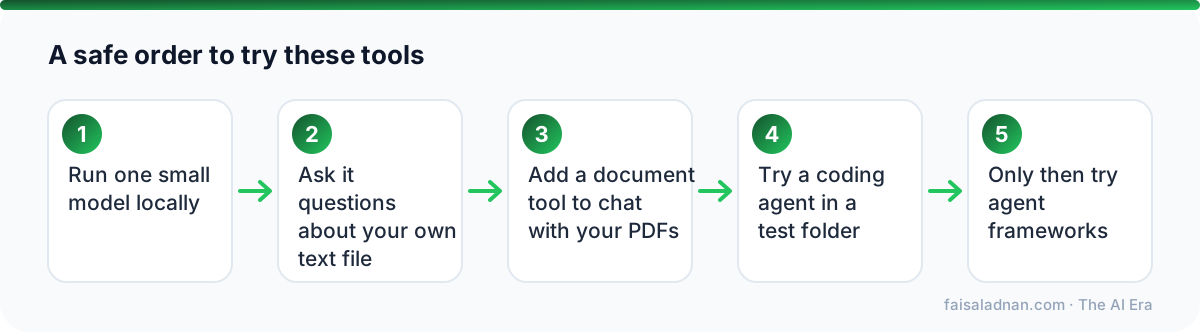
A reminder from the shutdown and database stories earlier in this series: do not give an agent write access to anything you cannot restore. Use a test folder. See the Replit database disaster for why.
Small local models make mistakes, so check what they say, just as you would with any AI tool. Next in this series: images, video, voice and no-code apps.
See the complete AI Era series
Written by Faisal Adnan
Business Intelligence and AI mentor. I teach Data Analytics, Power BI, Microsoft Fabric, SQL, Python and applied AI, and write about what is changing and what it means for your career.

Written by
Faisal Adnan is a data analytics and AI mentor from Pakistan. He teaches Power BI, Microsoft Fabric, machine learning and applied AI through live classes and 1-on-1 mentorship, and writes in plain language so students and working professionals can follow where AI is heading and what to learn next.
One page that lists every post in The AI Era series, grouped by theme, with a short method for checking any AI claim yourself.
By Faisal Adnan
Free tools to test AI apps, scan them for security problems and learn how models are built, including Playwright, promptfoo, garak, PyRIT, Semgrep and Karpathy's nanochat. Plus a starter plan.
By Faisal Adnan
Open-source tools for no-code AI apps, image and video generation and speech, including Urdu transcription with Whisper, plus a licence warning every builder should read.
By Faisal Adnan